> ## Documentation Index
> Fetch the complete documentation index at: https://bazel-pr-29946.mintlify.site/llms.txt
> Use this file to discover all available pages before exploring further.
# Using the Android Native Development Kit with Bazel
*If you're new to Bazel, please start with the [Building Android with Bazel](/versions/8.2.1/start/android-app) tutorial.*
Overview
Bazel can run in many different build configurations, including several that use
the Android Native Development Kit (NDK) toolchain. This means that normal
`cc_library` and `cc_binary` rules can be compiled for Android directly within
Bazel. Bazel accomplishes this by using the `android_ndk_repository` repository
rule.
Prerequisites
Please ensure that you have installed the Android SDK and NDK.
To set up the SDK and NDK, add the following snippet to your `WORKSPACE`:
```python theme={null}
android_sdk_repository(
name = "androidsdk", # Required. Name *must* be "androidsdk".
path = "/path/to/sdk", # Optional. Can be omitted if `ANDROID_HOME` environment variable is set.
)
android_ndk_repository(
name = "androidndk", # Required. Name *must* be "androidndk".
path = "/path/to/ndk", # Optional. Can be omitted if `ANDROID_NDK_HOME` environment variable is set.
)
```
For more information about the `android_ndk_repository` rule, see the [Build Encyclopedia entry](/versions/8.2.1/reference/be/android#android_ndk_repository).
If you're using a recent version of the Android NDK (r22 and beyond), use the
Starlark implementation of `android_ndk_repository`.
Follow the instructions in
[its README](https://github.com/bazelbuild/rules_android_ndk).
Quick start
To build C++ for Android, simply add `cc_library` dependencies to your
`android_binary` or `android_library` rules.
For example, given the following `BUILD` file for an Android app:
```python theme={null}
# In /app/src/main/BUILD.bazel
cc_library(
name = "jni_lib",
srcs = ["cpp/native-lib.cpp"],
)
android_library(
name = "lib",
srcs = ["java/com/example/android/bazel/MainActivity.java"],
resource_files = glob(["res/**/*"]),
custom_package = "com.example.android.bazel",
manifest = "LibraryManifest.xml",
deps = [":jni_lib"],
)
android_binary(
name = "app",
deps = [":lib"],
manifest = "AndroidManifest.xml",
)
```
This `BUILD` file results in the following target graph:
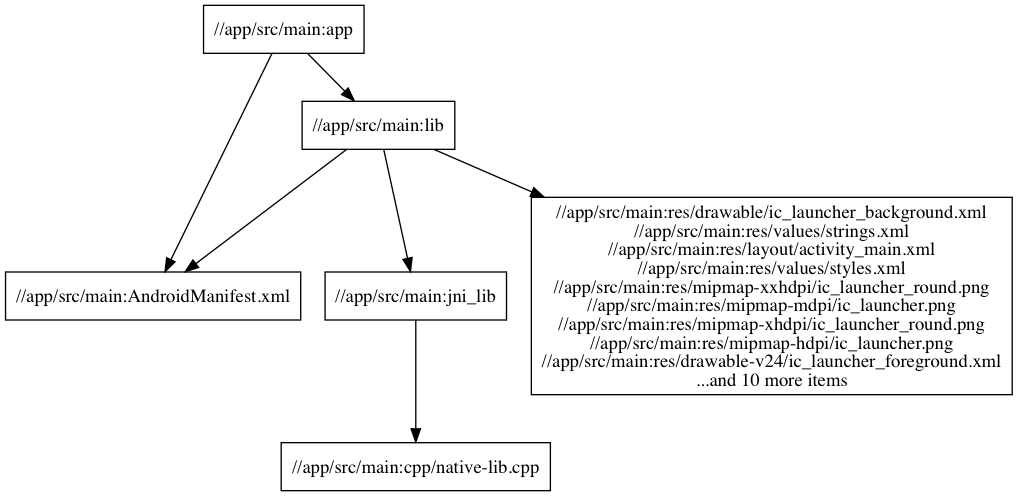 **Figure 1.** Build graph of Android project with cc\_library dependencies.
To build the app, simply run:
```posix-terminal theme={null}
bazel build //app/src/main:app
```
The `bazel build` command compiles the Java files, Android resource files, and
`cc_library` rules, and packages everything into an APK:
```posix-terminal theme={null}
$ zipinfo -1 bazel-bin/app/src/main/app.apk
nativedeps
lib/armeabi-v7a/libapp.so
classes.dex
AndroidManifest.xml
...
res/...
...
META-INF/CERT.SF
META-INF/CERT.RSA
META-INF/MANIFEST.MF
```
Bazel compiles all of the cc\_libraries into a single shared object (`.so`) file,
targeted for the `armeabi-v7a` ABI by default. To change this or build for
multiple ABIs at the same time, see the section on [configuring the target ABI](#configuring-target-abi).
**Figure 1.** Build graph of Android project with cc\_library dependencies.
To build the app, simply run:
```posix-terminal theme={null}
bazel build //app/src/main:app
```
The `bazel build` command compiles the Java files, Android resource files, and
`cc_library` rules, and packages everything into an APK:
```posix-terminal theme={null}
$ zipinfo -1 bazel-bin/app/src/main/app.apk
nativedeps
lib/armeabi-v7a/libapp.so
classes.dex
AndroidManifest.xml
...
res/...
...
META-INF/CERT.SF
META-INF/CERT.RSA
META-INF/MANIFEST.MF
```
Bazel compiles all of the cc\_libraries into a single shared object (`.so`) file,
targeted for the `armeabi-v7a` ABI by default. To change this or build for
multiple ABIs at the same time, see the section on [configuring the target ABI](#configuring-target-abi).
Example setup
This example is available in the [Bazel examples repository](https://github.com/bazelbuild/examples/tree/master/android/ndk).
In the `BUILD.bazel` file, three targets are defined with the `android_binary`,
`android_library`, and `cc_library` rules.
The `android_binary` top-level target builds the APK.
The `cc_library` target contains a single C++ source file with a JNI function
implementation:
```c++ theme={null}
#include
#include
extern "C"
JNIEXPORT jstring
JNICALL
Java_com_example_android_bazel_MainActivity_stringFromJNI(
JNIEnv *env,
jobject /* this */) {
std::string hello = "Hello from C++";
return env->NewStringUTF(hello.c_str());
}
```
The `android_library` target specifies the Java sources, resource files, and the
dependency on a `cc_library` target. For this example, `MainActivity.java` loads
the shared object file `libapp.so`, and defines the method signature for the JNI
function:
```java theme={null}
public class MainActivity extends AppCompatActivity {
static {
System.loadLibrary("app");
}
@Override
protected void onCreate(Bundle savedInstanceState) {
// ...
}
public native String stringFromJNI();
}
```
Note: The name of the native library is derived from the name of the top
level `android_binary` target. In this example, it is `app`.
Configuring the target ABI
To configure the target ABI, use the `--android_platforms` flag as follows:
```posix-terminal theme={null}
bazel build //:app --android_platforms=comma-separated list of platforms
```
Just like the `--platforms` flag, the values passed to `--android_platforms` are
the labels of [`platform`](https://bazel.build/versions/8.2.1/reference/be/platforms-and-toolchains#platform)
targets, using standard constraint values to describe your device.
For example, for an Android device with a 64-bit ARM processor, you'd define
your platform like this:
```py theme={null}
platform(
name = "android_arm64",
constraint_values = [
"@platforms//os:android",
"@platforms//cpu:arm64",
],
)
```
Every Android `platform` should use the [`@platforms//os:android`](https://github.com/bazelbuild/platforms/blob/33a3b209f94856193266871b1545054afb90bb28/os/BUILD#L36)
OS constraint. To migrate the CPU constraint, check this chart:
| CPU Value | Platform |
| ------------- | ------------------------ |
| `armeabi-v7a` | `@platforms//cpu:armv7` |
| `arm64-v8a` | `@platforms//cpu:arm64` |
| `x86` | `@platforms//cpu:x86_32` |
| `x86_64` | `@platforms//cpu:x86_64` |
And, of course, for a multi-architecture APK, you pass multiple labels, for
example: `--android_platforms=//:arm64,//:x86_64` (assuming you defined those in
your top-level `BUILD.bazel` file).
Bazel is unable to select a default Android platform, so one must be defined and
specified with `--android_platforms`.
Depending on the NDK revision and Android API level, the following ABIs are
available:
| NDK revision | ABIs |
| ------------ | ----------------------------------------------------------- |
| 16 and lower | armeabi, armeabi-v7a, arm64-v8a, mips, mips64, x86, x86\_64 |
| 17 and above | armeabi-v7a, arm64-v8a, x86, x86\_64 |
See [the NDK docs](https://developer.android.com/ndk/guides/abis.html)
for more information on these ABIs.
Multi-ABI Fat APKs are not recommended for release builds since they increase
the size of the APK, but can be useful for development and QA builds.
Selecting a C++ standard
Use the following flags to build according to a C++ standard:
| C++ Standard | Flag |
| ------------ | ----------------------- |
| C++98 | Default, no flag needed |
| C++11 | `--cxxopt=-std=c++11` |
| C++14 | `--cxxopt=-std=c++14` |
| C++17 | `--cxxopt=-std=c++17` |
For example:
```posix-terminal theme={null}
bazel build //:app --cxxopt=-std=c++11
```
Read more about passing compiler and linker flags with `--cxxopt`, `--copt`, and
`--linkopt` in the [User Manual](/versions/8.2.1/docs/user-manual#cxxopt).
Compiler and linker flags can also be specified as attributes in `cc_library`
using `copts` and `linkopts`. For example:
```python theme={null}
cc_library(
name = "jni_lib",
srcs = ["cpp/native-lib.cpp"],
copts = ["-std=c++11"],
linkopts = ["-ldl"], # link against libdl
)
```
Building a `cc_library` for Android without using `android_binary`
To build a standalone `cc_binary` or `cc_library` for Android without using an
`android_binary`, use the `--platforms` flag.
For example, assuming you have defined Android platforms in
`my/platforms/BUILD`:
```posix-terminal theme={null}
bazel build //my/cc/jni:target \
--platforms=//my/platforms:x86_64
```
With this approach, the entire build tree is affected.
Note: All of the targets on the command line must be compatible with
building for Android when specifying these flags, which may make it difficult to
use [Bazel wild-cards](/versions/8.2.1/run/build#specifying-build-targets) like
`/...` and `:all`.
These flags can be put into a `bazelrc` config (one for each ABI), in
`project/.bazelrc`:
```
common:android_x86 --platforms=//my/platforms:x86
common:android_armeabi-v7a --platforms=//my/platforms:armeabi-v7a
# In general
common:android_ --platforms=//my/platforms:
```
Then, to build a `cc_library` for `x86` for example, run:
```posix-terminal theme={null}
bazel build //my/cc/jni:target --config=android_x86
```
In general, use this method for low-level targets (like `cc_library`) or when
you know exactly what you're building; rely on the automatic configuration
transitions from `android_binary` for high-level targets where you're expecting
to build a lot of targets you don't control.